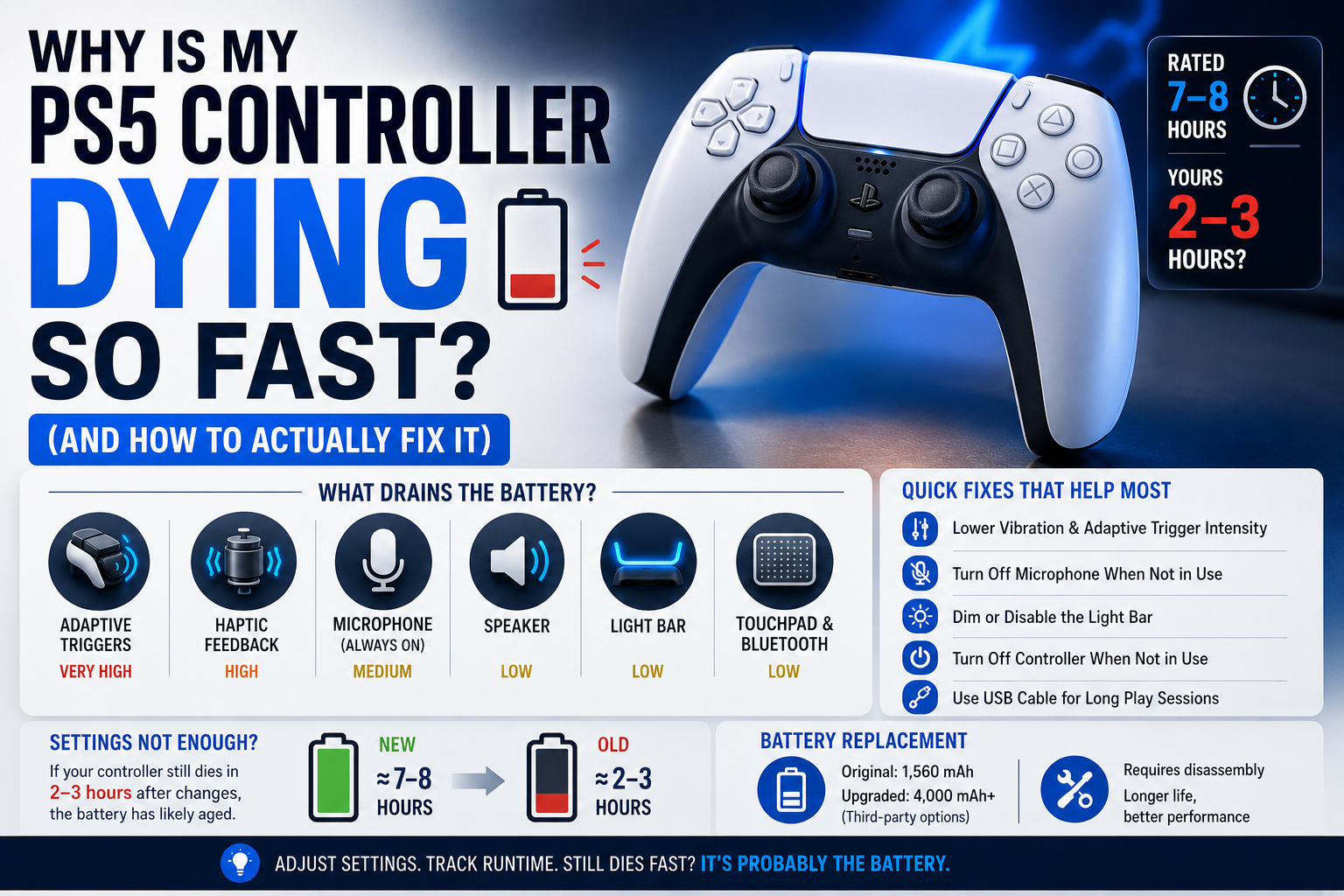
Mine was dying in under three hours, and I assumed the battery was just bad. A DualSense controller that dies in two or three hours instead of the seven to eight it is rated for is not broken by default. Most of the time it is a combination of settings left at their most power hungry defaults, usage habits, and, eventually, normal battery aging. Here is what actually drains it, what to change, and how to tell when the battery itself needs replacing.
The short answer
The DualSense packs more power hungry hardware than any PlayStation controller before it. Adaptive trigger motors, dual haptic feedback motors, a built in microphone, a speaker, a light bar, and a touchpad all draw from the same 1,560 mAh battery, and running all of them at maximum simultaneously is what pushes a controller that should last 7 to 8 hours down to 4 to 5. Lowering a handful of settings recovers most of that lost time.
If runtime does not improve after adjusting them, the battery has degraded and needs replacing. Lithium ion cells lose capacity permanently with every charge cycle, no matter how carefully the controller has been used.
The features doing the actual damage
The adaptive triggers are the single biggest power draw on the controller. The small motors that create resistance in L2 and R2 activate constantly in shooters, racing games, and anything that uses trigger effects, and they pull noticeably more current than a standard digital trigger ever did. Haptic feedback works the same way, running two separate motors that fire for nearly every in game event rather than the single rumble motor older controllers used.
The microphone, if left enabled, stays active listening for input even when you are not speaking, and the touchpad, light bar, and Bluetooth radio all add smaller but constant draws on top of that. None of these features are individually catastrophic. Running all of them at full strength at the same time is what turns a controller with 56 percent more battery capacity than the DualShock 4 into one that somehow feels like it dies faster.
Settings that actually make a difference
Lowering vibration intensity in the PS5 accessibility or controller settings menu reduces one of the largest draws without eliminating the feature entirely. Adaptive trigger intensity can be lowered the same way, and some games offer their own in game toggle for trigger effects separate from the system setting.
Dimming or disabling the light bar brightness saves a smaller but real amount, and it is one of the few settings most guides mention without actually explaining how much it contributes, which in practice is minor compared to haptics and triggers but still worth doing since it costs nothing in gameplay feel.
Turning off the microphone when not using voice chat prevents it from staying active in the background. None of these changes require choosing between features permanently. Most players adjust them down rather than off, and the difference between running everything at maximum versus a moderate setting is often the gap between 4 to 5 hours and 7 to 8.
The overcharging myth, and what is actually true
A common piece of advice is to avoid leaving the controller on the charger too long, based on the same logic people apply to phones. Modern lithium ion batteries, including the one in the DualSense, include charge management circuitry that stops accepting current once full, so leaving it connected overnight does not overcharge it in the way older battery chemistries could be damaged.
What does matter is heat. A controller charging in a hot room or under direct sunlight degrades faster over time than one charging in normal room temperature, regardless of how long it stays plugged in.
Leaving the controller powered on but idle, for example while watching something on the PS5 without touching it, does drain the battery unnecessarily. It is not asleep and still maintaining its Bluetooth connection. This is a more common and more overlooked cause of unexpectedly short battery life than actual overcharging.
Some games drain it faster than others, and that is normal
A fast paced shooter that fires adaptive triggers and haptic feedback constantly will drain a full charge noticeably faster than a turn based or slower paced game that rarely touches either feature.
This is not a sign anything is wrong. It reflects how much the specific game leans on the hardware Sony built into the controller. Noticing that battery life varies significantly between games, rather than assuming the controller itself has gotten worse, is a useful gut check before assuming a hardware problem.
When it stops being about settings
Lithium ion batteries degrade with use regardless of how carefully a controller has been treated. Each full charge and discharge cycle reduces the maximum capacity slightly, and after roughly 500 full cycles a typical lithium ion battery operates at around 80 percent of its original capacity.
Somewhere around 800 to 1,000 cycles, most batteries have degraded enough that the difference is very noticeable in daily use. A controller purchased at launch and used daily has likely passed through this range by now, which means settings adjustments will help but will not fully restore the runtime it had when new.
The way to tell settings from aging apart is consistency. If runtime improves clearly after lowering vibration, trigger intensity, and disabling the mic, the original drain was mostly behavioral. If a controller still dies in two to three hours after all of those changes and a full charge cycle, the battery itself has degraded past the point settings can compensate for.
It is worth ruling out that the haptic motors themselves are not stuck firing or misbehaving in the background, since a motor issue can masquerade as unusually fast battery drain in the same way it can masquerade as a rumble problem. Firing the strong and weak rumble motors independently confirms whether both are behaving normally rather than one running longer or harder than intended.
Wired play buys you more than it costs
Playing over USB instead of Bluetooth removes the wireless radio's power draw almost entirely. The controller is drawing directly from the console rather than relying on its internal cell for everything except the physical inputs.
For long sessions, especially ones already taxing the battery through heavy haptic and trigger use, plugging in during extended play removes one of the largest remaining variables instead of managing settings around it. This is also the more reliable way to play competitively, since Bluetooth introduces more variability in polling consistency than a direct wired connection.
Replacing the battery
Sony does not sell an official replacement battery for the DualSense, but third party options exist, including higher capacity cells around 4,000 mAh that can extend runtime well beyond the original 1,560 mAh battery once installed. Installing one means opening the controller shell completely, which is a more involved repair than a standard cleaning and typically follows a teardown guide step by step rather than something to attempt without one.
For anyone not comfortable opening the shell themselves, a local electronics repair shop can usually handle the swap for a reasonable fee.
Quick checklist before assuming the worst
Lower vibration and adaptive trigger intensity first, since these two settings alone account for most of the avoidable drain. Turn off the microphone when not in voice chat, and dim the light bar. Avoid leaving the controller powered on and idle for long stretches instead of letting it sleep, and plug in over USB for long sessions when possible.
After making all of those changes, track actual runtime on a full charge rather than judging by how the session felt. If that number improves significantly, the fix worked. If it stays roughly the same, the battery has aged past what settings can fix, and replacement is the next reasonable step rather than continuing to chase settings that were never the actual cause.
Common questions
Does turning off the controller between sessions actually help? Yes. Leaving it on standby while the console is idle or streaming content still drains the battery slowly, since the Bluetooth connection and internal systems stay active rather than fully powering down.
Is it normal for battery life to vary this much between games? Yes. A game that leans heavily on adaptive triggers and haptic feedback, most shooters and racing games included, will drain a full charge noticeably faster than a slower paced game that barely touches either feature.
Will a firmware update fix fast battery drain? Occasionally a firmware update addresses a specific power management bug, but it will not reverse normal lithium ion degradation or offset the power draw of features you are actively using at full intensity. Settings changes and, eventually, a battery replacement are the two things that reliably move the needle.